Vedu App APK
Vedu App lets users explore movies and shows. Learn about Vedu App APK, download steps, HD playback, features, and more.

Vedu App
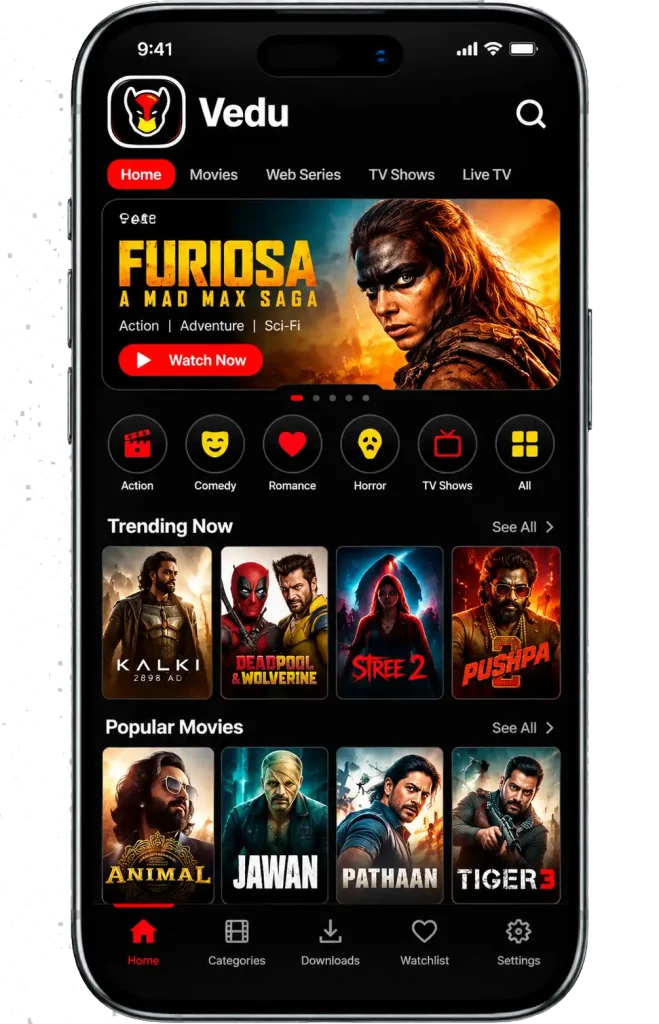
Vedu App is a streaming app made for people who like watching movies and shows. It gives users a simple place to explore different entertainment content. Many people look for the Vedu App APK because they want another way to access the app. The app is mainly discussed as an Android streaming option. Different websites describe movies, web series, sports, and live TV features. Some versions also mention HD and 4K video quality. Users can browse content and search for something they want to watch. The layout is generally described as simple and easy to use. This can make browsing less confusing for new users. The app is also promoted as a free entertainment option on several APK websites.
The Vedu App Download process is usually done through an APK file. This is useful for users who cannot find the same version through their normal app store. Some websites also use the term Vedu App Mod when describing altered APK files. However, version numbers and features can differ between these websites. So, users should check the file information before installing anything. The app is often described with features like HD playback, content search, watchlists, and offline viewing. Some sources also mention ad-free viewing and different video qualities. These features can make watching more convenient on a phone. Still, not every feature is confirmed for every Vedu version. The available information about different APK releases is not always the same.
What is the Vedu App?
Vedu App is commonly presented as an entertainment and streaming application. It is used for browsing movies, web series, television content, and other videos. Some online versions also mention sports and live TV. The app is mostly talked about in connection with Android devices. Users can open the app, look through categories, and search for available content. Some versions also describe different video quality options. These can include normal quality, HD, Full HD, and higher resolutions. A watchlist feature is also mentioned on several Vedu APK websites. Through this, users can keep selected movies or shows in one place. The exact content and functions can change between different releases.
The app is installed differently when it comes as an APK. Users first need to download the APK file from a source. After that, they can install the file on a compatible Android device. Some versions may use a different package format, such as XAPK. This means the installation process can be slightly different. Vedu is popular in APK discussions because it is described as a free streaming option. Some websites also mention regional content, including Bollywood and other Indian language movies. However, there is not one clearly verified Vedu release online. Different websites list different developers, versions, and features. Users should keep this difference in mind before downloading a file.
How to Download, Install, and Use Vedu App?
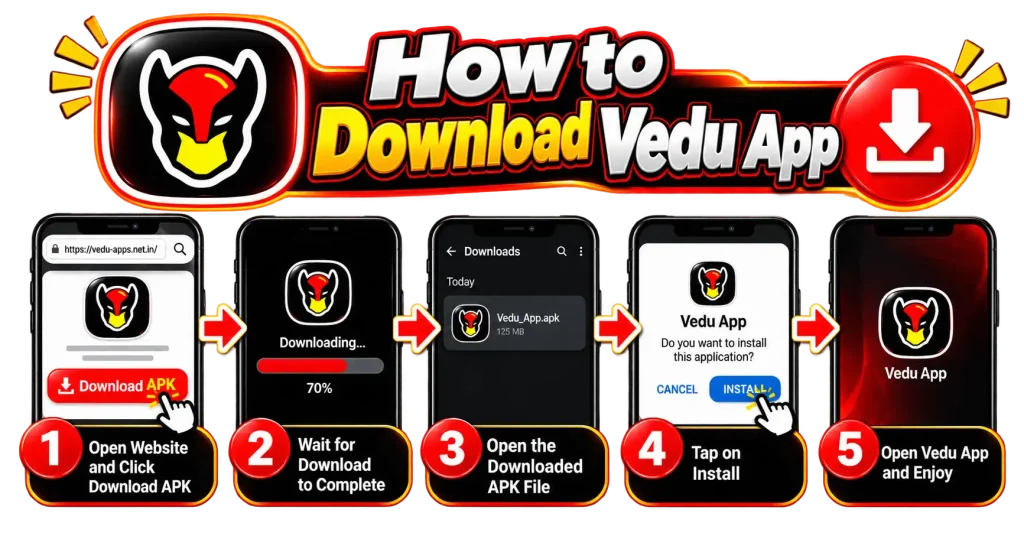
- First, find the Vedu App APK file from the source you want to use.
- Check the displayed version and file size before starting the download.
- Make sure your Android device has enough free storage space.
- Download the APK file and wait until the download finishes.
- Open your device settings if Android blocks the installation.
- Allow installation from the source used for the APK file.
- Return to your downloaded file and tap it to start installation.
- Wait for the installation process to finish on your device.
- Open Vedu App from your phone after the installation is complete.
- Look through the home screen and available content categories.
- Use the search option when you want a particular movie or show.
- Select available content and use the playback controls to watch it.
If the downloaded file is an XAPK, the normal APK installation method may not work directly. Some Android installation tools support this file type. One current Vedu listing, for example, identifies its package as XAPK rather than a basic APK.
Features of Vedu App
Movies and Web Series
Vedu App is mainly used for finding movies and web series. Users can browse different types of entertainment from the app. Several current listings describe movies and series as the main content. This makes the app simple for people who want both options together.
Different Entertainment Genres
The app provides different genres for browsing content. These can include action, comedy, drama, romance, thriller, fantasy, and family content. Genre sections make searching easier when users have no exact title in mind. You can simply open a category and check available titles.
Simple Search
A search option helps users find particular movies or shows. You can enter a title instead of checking every category. This saves some time during normal browsing. The search feature is also useful when you already know what you want to watch.
Watchlist
Some Vedu versions provide a watchlist for saving selected content. Users can add movies or shows for checking later. This means you do not need to search for the same title again. Watchlist availability can depend on the particular Vedu release you install.
HD Video Quality
Several APK listings advertise HD video playback in Vedu. Some versions also claim support for Full HD and 4K quality. The actual quality can depend on the available video and internet connection. So, higher quality is not necessarily available for every title.
4K Playback
Some Vedu APK websites list 4K playback as an available feature. This can provide sharper video when the source supports it. Users may also find different quality choices inside the player. The exact options can change between different releases of the application.
Built-In Video Player
Some versions are described as having a built-in video player. Through this, users can play content without opening another player. Basic controls can include play, pause, volume, and playback options. Extra player controls may differ depending on the version.
Subtitle Support
Some Vedu APK listings mention subtitles in different languages. Subtitles can help users understand content when the audio language is different. Certain versions also claim options for changing subtitle text size or appearance. These options should not be expected in every release.
Custom Playback Controls
Some releases provide extra controls inside the video player. These can include playback speed, brightness, screen ratio, and volume settings. Such controls give users more control while watching videos. The available controls can be different across Vedu APK versions.
Content Categories
Vedu makes browsing easier by separating content into categories. Users can move between movies, shows, and different genres. This simple layout can reduce the need for repeated searching. It is useful when someone wants to browse without choosing a title first.
Live Sports
Some Vedu APK websites advertise live sports along with movies and shows. This gives the app a wider entertainment purpose in those releases. Sports availability may depend on the version and its content sources. It should not be assumed that every Vedu app provides the same sports streams.
Live TV Content
Some versions also describe live TV as part of the available content. Users can use this type of feature for real-time channels instead of only movies. However, live channel availability can change over time. Different Vedu releases may also provide different channel selections.
Ad-Free Viewing
Some websites advertise certain Vedu APK versions as having no advertisements. This can make the viewing screen less interrupted. The claim is mainly connected with unofficial or altered releases. It should not be treated as a feature of every app carrying the Vedu name.
Offline Downloads
Some APK listings mention the ability to download videos for offline viewing. This can be useful when internet access is not available. Download options may also depend on the specific release. Users should check the installed version because this feature is not consistently documented across Vedu listings.
Simple Interface
The Vedu interface is generally described as simple and easy to browse. Users can move between categories and content without many complicated menus. This makes the basic browsing process easier for new users. The exact interface can look different between separate Vedu releases.
Regular Content Updates
Some Vedu websites claim that new movies and episodes are added regularly. This can help users find newer entertainment content. The timing of updates can depend on the particular source and release. Therefore, the update experience may not be the same for everyone.
Pros and Cons of Vedu App
Pros
- Simple interface for normal browsing.
- Movies and web series in one place.
- Different genres for easier searching.
- Search option for finding specific titles.
- Watchlist support in some versions.
- HD playback is advertised by several releases.
- Some versions claim Full HD and 4K support.
- Some releases include subtitle options.
- Some versions advertise live sports.
- Some releases mention live TV content.
- Extra player controls are available in some versions.
- APK installation gives another Android installation option.
Cons
- Different Vedu apps use the same name.
- Features can change between different releases.
- Some APK versions come from unofficial websites.
- Advertised features are not always consistent.
- Some content sources may change or stop working.
- Manual APK updates can require extra steps.
Vedu App vs Official Streaming Apps
Many users want to understand how Vedu differs from regular streaming apps. The main difference is the way each application is distributed and presented. Vedu APK versions are often downloaded outside normal app stores. Official services usually provide their apps through recognized stores and support systems. Features such as video quality, downloads, ads, and watchlists can also depend on the exact version. So, the difference is not only about watching videos. It also includes installation, updates, and where the application comes from.
| Feature | Vedu App | Official Streaming Apps |
| APK installation | Available | Usually no |
| App Store support | Version dependent | Available |
| Movie discovery | Available | Available |
| Web series | Available | Available |
| Watchlist | Version dependent | Usually available |
| HD quality | Version dependent | Available |
| 4K quality | Some versions | Selected plans |
| Offline viewing | Version dependent | Usually available |
| Regular updates | Manual for APKs | Automatic |
| Official support | Version dependent | Available |
Vedu App Alternatives
Some users look for other apps when Vedu does not have their needed content. Official streaming services can provide a different way to watch movies and shows. They may also offer clearer updates, account systems, and support. Some alternatives are available through normal app stores. Others focus on particular types of entertainment.
Netflix
Netflix is a well-known streaming service for movies and shows. Users can browse many categories from its mobile application. It also supports downloads for watching selected content without internet. Video quality depends on the plan and available content. Compared with Vedu, Netflix uses an official subscription system and regular app updates. Its content is also managed through a formal service. The app is available on Android, iOS, smart TVs, and other devices.
Amazon Prime Video
Amazon Prime Video provides movies, series, and other video content. Users can stream titles through its Android and iOS applications. Selected content can also be downloaded for offline viewing. The service supports different video qualities based on the title and device. Compared with Vedu, Prime Video is an official paid service with store-based updates. It also has account management and support options for users.
Disney+
Disney+ is another streaming service focused on movies and television shows. Its library includes content from Disney and other related brands. Users can watch supported titles through mobile devices, televisions, and web browsers. Some content can also be downloaded for offline use. Compared with Vedu, Disney+ works through an official subscription model. Its application receives updates through normal app stores, which makes installation more direct.
YouTube
YouTube is a large video platform with many different types of content. Users can watch videos, channels, live streams, and selected movies. The platform is available on Android, iOS, computers, and smart TVs. Some content is free, while other content can require payment. Compared with Vedu, YouTube has a much wider range of video content. It also provides official applications and regular platform updates.
FAQs
What is Vedu App?
Vedu App is commonly described as an entertainment and streaming application. It is used for browsing movies, shows, and other video content. Different versions can have different features and content.
Is Vedu App safe to use?
Safety depends on the exact APK and its download source. Different websites provide different Vedu files. Users should check the file before installation and avoid unknown files.
Is Vedu App free to use?
Many websites describe Vedu as a free streaming application. However, different releases can have different features and access methods. Users should check the terms of the particular version.
Does Vedu App require root access?
A normal Android APK generally does not require root access. Users can normally install an APK without rooting the phone. The exact installation process can depend on the file type.
Can I use Vedu App on iPhone?
Vedu is mainly discussed as an Android application. Some websites may mention iOS access, but availability can change. Users should check whether an official iOS version exists before installing anything.
Can I use Vedu App on a PC?
An Android emulator can be used to run many Android applications on a PC. Users can install an emulator and then try installing a compatible Vedu APK. Results can vary based on the APK and emulator.
Does Vedu App support downloads?
Some Vedu listings mention offline downloads. This feature is not clearly available in every version. Users should check the installed release before depending on downloads.
Why is Vedu App not on the Play Store?
There are several applications using the Vedu name. Some APK versions are distributed through websites instead of normal app stores. Users should check the developer and application details before installing a particular file.
Conclusion
Vedu App is commonly searched by users who want a simple entertainment application. It is mainly associated with movies, web series, and video streaming. Some versions also mention sports and live TV content. Users can browse categories and search for different titles. The application is also discussed because APK versions can be installed directly on Android devices. This gives users another installation method outside normal app stores. Some releases advertise HD, Full HD, or even 4K playback. Other versions mention subtitles, watchlists, downloads, and extra player controls. These features can make the application useful for regular video browsing. Still, the available functions are not always the same. Different websites provide different Vedu files and versions. This makes checking the exact release important before installation.
The Vedu App Download process is usually simple when the file is compatible. Users download the APK and install it after allowing the required Android permission. Some files can have a different package format, so installation may not always work in the same way. Vedu App APK listings also vary in size, version, developer information, and features. Some websites use the term Vedu App Mod for altered versions. Such files can have different behavior from regular releases. Users should therefore check the source and file details before installing. Official streaming services can also provide similar movie and series viewing. Those services usually offer regular updates through official stores. They may also provide clearer account and support systems. The app itself remains one of several options discussed by Android streaming users.